Contents
- 1 The Quiet Architecture Behind Your PHP: Why Apache and Nginx Matter More Than You Think
- 1.1 Understanding the core difference
- 1.2 How PHP actually gets executed
- 1.3 Performance and scalability in the real world
- 1.4 Flexibility and customization
- 1.5 The hybrid approach: best of both worlds?
- 1.6 Making the decision for your situation
- 1.7 The real consideration: operations and debugging
- 1.8 The emotional reality of choosing infrastructure
- 1.9 Looking forward
The Quiet Architecture Behind Your PHP: Why Apache and Nginx Matter More Than You Think
There's a moment that comes late in a developer's career—usually around 2 AM, staring at a production dashboard that's about to melt—when you finally understand that your choice of web server isn't just infrastructure. It's philosophy. It's a decision about how your code will live, breathe, and ultimately perform under pressure.
Most of us never think about this until we have to. We inherit Apache configurations from shared hosting providers, or we spin up Nginx because it's trendy, or we follow a tutorial without asking why. But the differences between Apache and Nginx run deeper than speed benchmarks and memory usage. They shape how dynamic content gets executed, how static files get served, and fundamentally, how your PHP applications interact with the world.
I want to talk about this honestly. Not as a checklist of features, but as someone who's felt the weight of choosing wrong and the relief of choosing right.
Understanding the core difference
Here's the thing that matters most: Apache and Nginx handle connections in completely different ways, and this isn't a detail—it's the foundation of everything else.
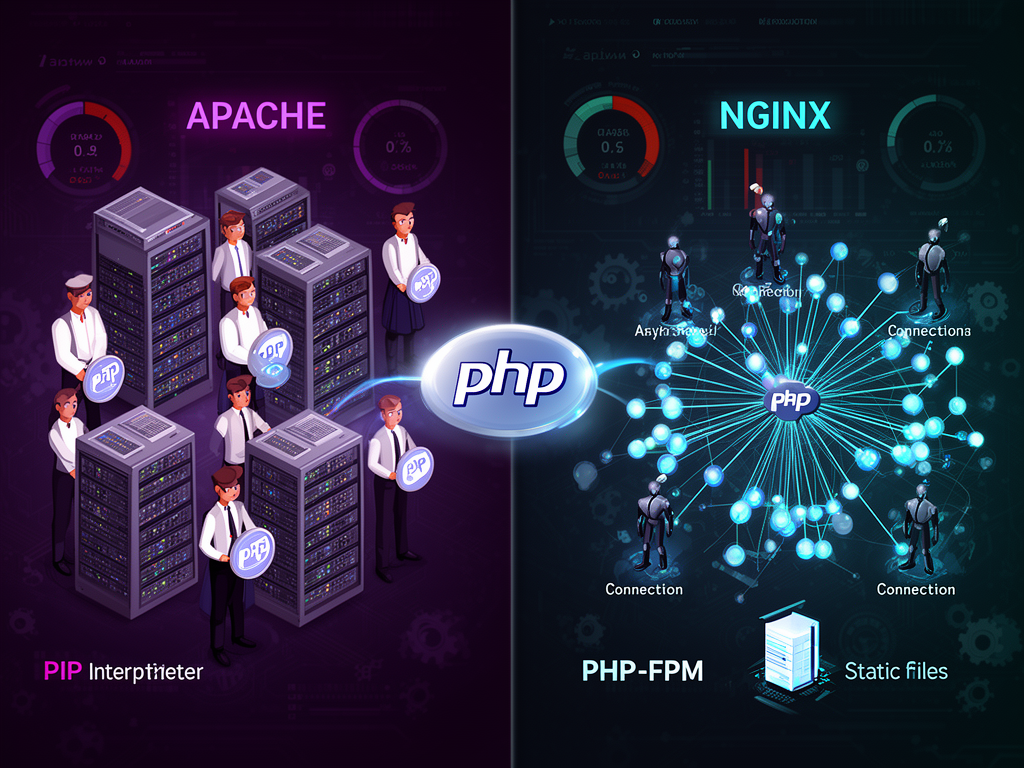
Think of Apache like a restaurant where the manager assigns a dedicated waiter to every single customer who walks in. Each waiter stays with that customer for the entire duration of their meal. If you have 100 customers, you need 100 waiters. If you have 1,000 customers, you need 1,000 waiters. It works, but the overhead becomes crushing.
Nginx works differently. It's more like having a small team of experienced servers who work the entire restaurant together. Each server doesn't own a table—they work in a continuous loop, checking which tables need attention and handling whatever comes up. When a customer needs something, a server picks up that request, handles it asynchronously, and moves on to the next one.
This is called event-driven architecture versus process-driven architecture, and the implications are massive.
Apache uses multi-processing modules (MPMs) that dictate how client requests get handled. These modules determine whether Apache spawns new processes, threads, or workers for each connection. It's configurable and powerful, but it's fundamentally sequential—each process handles its work one thing at a time.
Nginx spawns worker processes, each of which can handle thousands of connections simultaneously. It does this by implementing a fast event loop that continuously checks for and processes events. The crucial insight here is the decoupling: actual work gets separated from connections. A worker doesn't care about a connection until something actually needs to happen.
The result? Under heavy load, Nginx's memory and CPU usage stays relatively consistent because you're not spawning new processes for every request. Apache's usage climbs as load increases because it's creating new workers. This is why people say Nginx scales better—it's not marketing. It's architecture.
How PHP actually gets executed
This is where it gets interesting, because Apache and Nginx handle PHP in fundamentally different ways, and this difference will shape your deployment decisions.
Apache can embed the PHP interpreter directly into its worker processes. This is called mod_php. When a request comes in, Apache's worker can execute PHP code natively, right there in the same process. This was revolutionary when it happened. It made the LAMP stack (Linux-Apache-MySQL-PHP) the default architecture for web development. You could write PHP, drop it on shared hosting, and it just worked.
But there's a cost. PHP runs inside every Apache worker, even when you're serving static files. A static JPG request still loads the entire PHP interpreter, consuming memory for nothing. This is why mod_php, despite its elegance, falls out of favor in production environments.
Nginx doesn't have the ability to process dynamic content natively. This wasn't a limitation—it was a design decision. Nginx has no built-in PHP processor. When a PHP request arrives, Nginx has to hand it off to an external application server and wait for output to be returned.
This sounds like a disadvantage. But it's actually liberating.
The external processor is typically PHP-FPM (FastCGI Process Manager). PHP-FPM runs as a separate service, listening on a socket or network port. Nginx proxies PHP requests to PHP-FPM, which handles the actual execution. When the PHP processing is done, the result comes back to Nginx, which serves it to the client.
Here's why this matters: static content never touches PHP. A CSS file, a JavaScript file, an image—all of it gets served directly by Nginx without any PHP overhead. PHP-FPM only starts up when you actually need to execute PHP code. The separation of concerns is clean, and the performance implications are real.
Setting this up requires actual configuration. You need to edit Nginx's configuration file, uncomment the PHP-FPM section, and point it to the PHP-FPM socket. It's a few more steps than mod_php, but it's not complicated:
- Add index.php to the index directive
- Uncomment the FastCGI entry block
- Enable fastcgi_pass to point to your PHP-FPM socket (typically unix:/run/php/php8.1-fpm.sock or similar)
- Restart both Nginx and PHP-FPM
The result is a cleaner separation of concerns and, in practical terms, better performance under load.
Performance and scalability in the real world
If you read any performance comparison, you'll see variations of this claim: Nginx is at least twice as fast as Apache. This number comes from the architectural difference. Nginx's event-driven approach processes information concurrently, while Apache processes requests sequentially. Under heavy load, this difference becomes obvious.
For static content, this advantage is overwhelming. Nginx excels at serving static files—it's what it was designed for. If your application serves a lot of static content (and most do), Nginx will win decisively.
For dynamic content executed through PHP-FPM, the difference is less pronounced but still significant. PHP-FPM execution time is roughly the same regardless of whether you're on Apache or Nginx—PHP is PHP. But the overhead of managing connections and routing requests is lower with Nginx.
There's a nuance here that matters: if you have high-traffic, you want Nginx's event-driven architecture. The non-blocking nature of its event loop means the server stays responsive even under pressure. Apache's process model becomes a liability at scale—each additional connection means additional overhead.
But here's the honest part: if your website gets moderate traffic and you're not running into resource problems, this architectural difference might not matter to you in practice. Both will work. The question is how much headroom you want when your site becomes successful.
Flexibility and customization
Apache's greatest strength isn't performance—it's flexibility. Apache can be customized extensively through dynamically loadable modules. Want form-based authentication? There's a module. Need to rewrite URLs? Module. Want to serve content from multiple backends? Module.
These modules can be enabled or disabled without restarting the entire server. This is dynamic loading, and it's powerful. For developers who know what they're doing, Apache's customization capabilities can genuinely outweigh Nginx's speed advantage.
Nginx takes a different approach. Many Nginx modules require compilation into the Nginx binary during installation, rather than being dynamically loaded. This is less flexible in some ways—you can't just enable a module without recompiling—but it's actually by design. Nginx modules are optimized during compilation, leading to more efficient execution.
There's also the matter of .htaccess files. Apache supports per-directory configuration through .htaccess files, which are interpreted when encountered along the request path. This means you can configure behavior without touching the main Apache configuration file. It's how shared hosting works—users can control their own directories without getting full server access.
Nginx doesn't support .htaccess. Configuration is centralized in the Nginx configuration file. You can create per-location blocks, but this requires server-level configuration access. In shared hosting environments, this is a liability. For controlled, single-application deployments, it's cleaner.
Apache also leans heavily toward filesystem-based routing. It maps URIs to filesystem locations using directives like Alias and <Location> blocks. You can work with the actual filesystem structure, which feels intuitive but can become tangled in complex configurations.
Nginx interprets requests as URIs rather than filesystem locations. It selects the appropriate server and location blocks, then maps the URI to the filesystem based on your configuration. The separation between URI handling and filesystem handling is clearer, which leads to more predictable configurations at scale.
The hybrid approach: best of both worlds?
There's a clever pattern that's become increasingly popular: running Nginx as the front-end web server and Apache as the backend application server. Nginx handles static content and connection management, while Apache handles dynamic PHP execution with mod_php.
Why would you do this? Nginx gets to do what it's best at—serving static content with minimal overhead. Apache gets to do what it's designed for—executing PHP through mod_php. The separation means Nginx stays lean and responsive, while Apache doesn't waste resources on static files.
For dynamic content, Nginx proxies requests to Apache, which processes them and returns the rendered page. Nginx then passes the response back to the client.
This pattern works particularly well if you have:
- Legacy Apache configurations that rely heavily on
.htaccess - Complex mod_php setups that you don't want to rewrite
- Enough traffic that you want Nginx's scalability for static content
- The infrastructure to run both servers
It's not the simplest architecture, but it combines the strengths of both approaches.
Making the decision for your situation
After all this, the question remains: which should you choose? The answer is frustratingly context-dependent, but let me break it down by scenario.
Choose Apache with mod_php if:
You're on shared hosting or a managed hosting platform that provides it. You have legacy PHP applications that depend on .htaccess configuration. You're not dealing with high traffic volumes. You value simplicity over optimization. You need extensive module customization without recompilation.
Choose Nginx with PHP-FPM if:
You're running your own server or using a modern VPS provider. You need to scale to handle increasing traffic. You want clean separation between static content serving and PHP execution. You're building new applications without existing Apache dependencies. You value performance efficiency and want consistent resource usage under load.
Choose the hybrid approach if:
You have existing Apache infrastructure that works but you need better static content performance. You're migrating from Apache to Nginx and want a gradual transition. You have complex requirements that benefit from Apache's modules but need Nginx's scalability. You have the operational capacity to manage both services.
The actual performance difference in real-world scenarios often depends more on your configuration, caching strategy, and application code than on the choice of web server itself. An optimized Apache setup with caching will outperform a poorly configured Nginx setup. The architectural advantage matters most when you're dealing with high concurrency or significant traffic growth.
There's also something worth saying about the evolution of Apache itself. Apache 2.4 introduced significant performance improvements and new modules designed to reduce memory usage. It's not the Apache of 2005 anymore. If you're considering Apache, you should be looking at modern versions, not legacy configurations.
The real consideration: operations and debugging
What often doesn't make it into these comparisons is the operational reality. When something breaks at 2 AM, you don't care about benchmarks—you care about understanding what went wrong.
Apache's configuration is verbose but explicit. When you look at an Apache configuration file, you can usually understand what's happening. The directives are readable. The module system is transparent.
Nginx's configuration is more concise, which is elegant until it isn't. The location block matching rules can be subtle. The lack of .htaccess means configuration issues require server access and configuration changes. For someone unfamiliar with Nginx, debugging can be harder.
But Nginx's event-driven model also means fewer processes to troubleshoot. There's less state to track. With Apache, sometimes a misbehaving PHP script can consume resources across multiple worker processes, creating cascading failures. With Nginx and PHP-FPM, the PHP interpreter runs separately, so you get better isolation.
The monitoring and logging story differs too. With Apache and mod_php, you're looking at single process logs. With Nginx and PHP-FPM, you have access logs, Nginx error logs, and separate PHP-FPM logs. More logs can mean more information, but also more places to look when debugging.
The emotional reality of choosing infrastructure
Here's something nobody talks about: infrastructure choices carry emotional weight. When you choose Apache, you're choosing stability and backward compatibility. Apache has been the standard for 25+ years. It's the choice your predecessor made. It probably works fine.
When you choose Nginx, you're choosing optimization and forward momentum. You're saying "we're building something new here, and we want it to scale efficiently." There's ambition in that choice, even if that ambition never materializes because your traffic stays moderate.
The choice you make shapes your team's relationship with infrastructure. Apache teams tend to be more comfortable with sprawling configurations and extensive customization. Nginx teams tend to be more minimalist, preferring simpler, cleaner setups.
There's no moral dimension here—both are valid approaches. But it's worth acknowledging that your choice of web server says something about your values as an engineer and your team's engineering culture.
Looking forward
The landscape is shifting. Modern PHP deployment increasingly favors the separation of concerns that Nginx with PHP-FPM provides. Containerization has made it easier to run multiple services—Nginx in one container, PHP-FPM in another. This architecture has become the de facto standard for cloud-native PHP deployments.
Apache hasn't disappeared—it's still deployed on millions of servers—but it's become the choice you inherit rather than the choice you make. When building new applications, most developers reach for Nginx first.
There are also newer alternatives emerging, like LiteSpeed, which offers performance comparable to Nginx with better PHP integration than either Apache or Nginx. But these are still the exception rather than the rule.
The most important thing is to understand why you're choosing what you choose. Don't pick Nginx because it's trendy. Don't stick with Apache because it's familiar. Choose based on your actual requirements: traffic patterns, configuration needs, team expertise, and operational capacity.
And understand that this choice isn't permanent. You can migrate. It's not fun, and it requires careful planning, but it's possible. Many teams have successfully migrated from Apache to Nginx when their needs changed. The web server is one layer in your stack—important, but not immovable.
The real architecture lives in your application code, your database design, your caching strategy. The web server is the vehicle. Choose one that matches where you're going, not where you've been, and you'll make a decision you can live with when the 2 AM debugging sessions inevitably arrive.